Debug HTTPS traffic
Native desktop Inspector on Windows, macOS, and Linux — decrypt HTTPS, turn on system proxy, and inspect sessions, headers, and bodies. Only on machines you control.
Inspect HTTPS traffic, put a reverse proxy in front of your apps, or embed the same engine in .NET — on Windows, Linux, and macOS.

Inspector · Windows / macOS / Linux
Desktop debugger for HTTP and HTTPS. Free for personal and education use (PolyForm Noncommercial); commercial use needs a separate license. Download → Inspector guide.
Plus · optional
Dashboard, metrics, auth helpers, and a thin WAF. After the CLI: titanium update --plus. Plus.
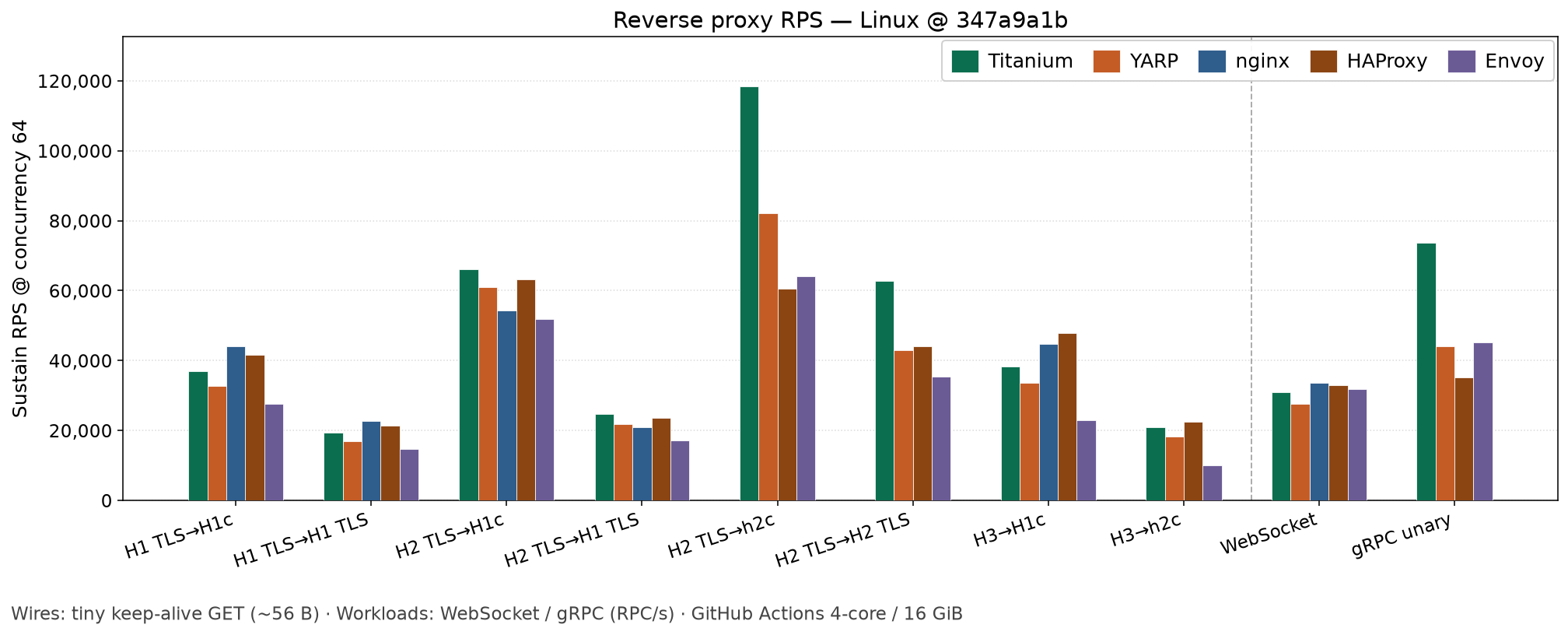
Throughput (requests per second) vs YARP, nginx, HAProxy, and Envoy on GitHub Actions runners (Windows / Linux ~4 vCPU; macOS Apple Silicon). Linux tiny-GET chart here; Windows, macOS, 64 KB practical charts, and heavier workloads on the performance page.
# Download a CLI zip from /download, then:
titanium test -c twp.yaml
titanium run -c twp.yamlschemaVersion: "7.1"
listeners:
- host: "127.0.0.1"
port: 8000
# false = plain reverse proxy (no HTTPS decrypt)
decryptSsl: false
forwardHost: "127.0.0.1"
forwardPort: 8080using System.Net;
using Titanium.Web.Proxy;
using Titanium.Web.Proxy.Models;
using var proxyServer = new ProxyServer();
proxyServer.BeforeRequest += async (s, e) =>
{
Console.WriteLine(e.HttpClient.Request.Url);
};
var endPoint = new ExplicitProxyEndPoint(IPAddress.Loopback, 8000, decryptSsl: true);
proxyServer.AddEndPoint(endPoint);
proxyServer.CertificateManager.EnsureRootCertificate(
userTrustRootCertificate: true,
machineTrustRootCertificate: false);
proxyServer.Start();